
Coral Casino App and Mobile Experience
 Available in GB
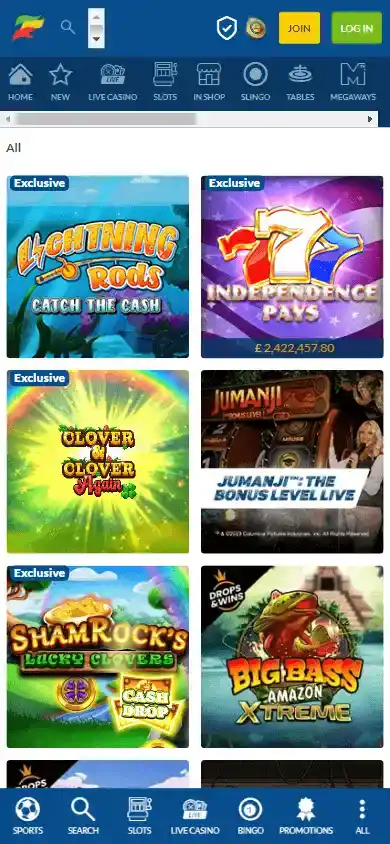
Coral offers casino access through dedicated mobile apps and mobile browsers.
Coral currently has dedicated casino apps for both Android and iPhone/iPad in the UK, and its app-store listings cover slots, roulette, blackjack and live casino. The practical choice is not simply app versus no app: UK players can decide whether a dedicated app is worth installing for repeat use or whether the mobile website is enough for occasional account access. The same Coral account sits behind the mobile experience, so registration, verification and payment checks still matter whichever route you use.
Coral has dedicated casino apps on Android and iOS
The current Google Play listing names the product “Coral Casino: Slots & Games” and shows LC International Limited as the publisher. The current UK Apple App Store also lists “Coral Casino: Slots & Games” for iPhone and iPad, with Entain Operations Limited shown as the provider. These are direct app-store signals that Coral maintains dedicated casino software on both major mobile platforms.
The app-store listings identify an 18+ real-money gambling product. Use an official listing rather than a third-party download site. Operating-system requirements and installation size can change with an app update, so use the compatibility information shown for your particular device.
What you can do in the Coral casino app
Coral’s current Android and iOS casino listings identify the main casino categories available in the app: slot games, roulette, blackjack and live casino. That matches the broader Coral casino offering described in the Coral casino games guide. The mobile product is therefore not presented as a single-purpose slots app, even though slots are a prominent part of the catalogue.
| Mobile task | Dedicated app | Mobile browser |
|---|---|---|
| Open casino categories | Built around the installed Coral casino interface | Use Coral through the phone browser |
| Slots | Verified as a current app category | Available through Coral’s mobile casino experience |
| Roulette and blackjack | Both are named in current app-store listings | Use the current casino lobby and game pages |
| Live casino | Named in the app listings | Use the live lobby in the browser |
| Account and funding checks | Use the logged-in account tools exposed in the app | Use the same Coral account through the site |
Mobile and desktop catalogues are not necessarily identical. Check the relevant category on the device you intend to use. The Coral live casino information describes the live-table categories, while actual table availability appears in the casino lobby.
App or mobile browser: which route makes sense?
A dedicated app is most useful when Coral is something you expect to open repeatedly. An installed app gives you a persistent launch point and a mobile interface designed around the casino product. That can reduce the friction of finding the site again in a browser, particularly if you regularly move between the casino lobby and account areas.
The mobile browser is the lighter option. It avoids an install and is useful when you only need to check a page, sign in occasionally or use a device on which you do not want another gambling app installed. Browser access can also be useful when you want to compare the casino with information elsewhere on the web without switching between an app and a browser.
Neither route changes the underlying need for an account, identity checks or permitted payment methods. If the next task is creating an account, the Coral casino registration page explains where verification fits into the journey. If the next task is funding an account, use the Coral casino payment methods guide rather than assuming every wallet or card route works in exactly the same way on mobile.
Joining and signing in on a phone
The app offers a dedicated mobile interface without creating a different type of Coral casino account. New customers still complete registration and the checks required for a UK gambling account. Existing customers use their established account rather than creating a second identity simply because they installed an app.
That matters when troubleshooting. If a login, verification or payment issue is tied to the account, changing from browser to app does not necessarily remove the underlying account requirement. Check the account message itself first. A display or navigation problem may be interface-specific, but an identity check is an account-level matter.
Mobile play is better judged by task than by marketing claims
For mobile use, the practical questions are whether you can reach the intended game category, manage the same account, inspect payment options and locate safer-gambling controls. Ease of use depends on the device, connection, accessible controls and the task being performed; a generic speed label says little about an individual session.
Before playing, also consider the conditions around mobile use. A small screen can make game rules, bonus terms and table information easier to overlook. If a game or promotion matters, open the relevant information before staking rather than assuming the condensed mobile view contains every detail at a glance. This is especially useful for live tables, where the displayed betting range and rules can vary by table.
App-store information and device compatibility
The current official store pages are strong evidence that dedicated Android and iOS casino apps exist and that they advertise slots, roulette, blackjack and live casino. They are not evidence that every game in Coral’s desktop catalogue is available on every handset. They also should not be used to promise a fixed download size or operating-system requirement indefinitely, because those are store fields that can change after an update.
App-store feedback can describe an individual customer’s experience, but it does not establish how an app will behave on every device. The store listing identifies the product, its listed provider, age rating and advertised game categories. The device’s own store view also displays the current compatibility information relevant to that installation.
The app-store provider name, app title and supported device details help identify the intended product. Check the listing on your own device. A phone can support the stated operating system while an individual game or feature remains unavailable, so the relevant category and account screen give a more useful picture of what you can access.
A store update can also change the permissions or features described in the listing. Before installing or updating, read the current listing and check that the app belongs to the Coral service you intend to use. If you prefer not to install another application, the mobile website is a separate access route for comparing navigation and account tasks. Neither route alters the identity checks attached to the Coral account.
Mobile account continuity matters more than the device
The app and mobile site are two ways of reaching the same Coral relationship, so a player should not plan around separate balances, separate verification histories or a second casino identity for each device. The useful continuity is account-level: if Coral needs an identity check, a payment review or a safer-gambling control, that requirement should be treated as part of the account rather than as something tied only to one screen.
This also makes switching devices easier to think about. Choose the interface that is practical for the task, then rely on the live account status for anything that affects access or funding.
A simple mobile checklist before you install
- Open the official Google Play or UK Apple App Store listing rather than a third-party download source.
- Check the current device compatibility shown by the store before installing.
- Confirm that the game category you want is visible in the current Coral product rather than assuming the desktop and app catalogues are identical.
- If you are registering for the first time, expect account verification requirements to apply on mobile as they do elsewhere.
- If you are depositing, check the live cashier and the payments guide rather than relying on an old list of methods.
- Use the browser instead if you only need occasional account access and do not want a persistent app on the device.
Before switching devices, make sure you can access the sign-in method associated with the account. Account security and verification requirements continue to apply after an app update or a browser change. If the account requests documents or a payment confirmation, follow the instructions inside Coral instead of using links or contact details supplied in an unexpected message.
Use deposit limits, reality checks or other available account controls according to the boundary you want. A smaller screen does not change the money risk of a session, and mobile convenience should not make it harder to notice the time or amount spent.
When the Coral app is more useful than the mobile site
The Coral app makes the strongest case when you want a dedicated, repeat-use casino interface on a personal phone or tablet and the current official store listing supports your device. The mobile website is often enough for occasional access, quick account checks or users who prefer not to install gambling software.
Both routes lead back to the same practical questions: what you want to play, whether your account checks are complete, and which payment options are available. Start with the Coral Casino UK Review 2026 for the broader picture, then choose app or browser based on the task rather than on a generic claim that one format is universally better.